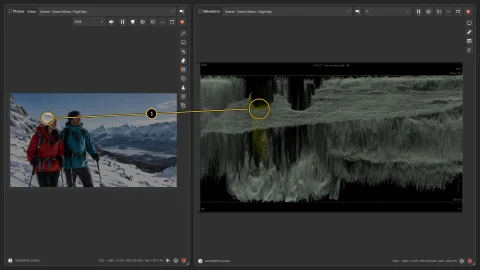
How bright should this snowy scene feel?
Snow and winter clothing give you a useful high-key exposure example. See where the people and bright landscape fall in Waveform.
Practice scenes
Try a quick shot assessment or explore one exposure or color question at a time. Built-in scenes and test patterns let you get started without a camera or capture device.
In the desktop source selector, choose Generated and browse the scene categories. These examples connect a familiar subject to a practical check. Each guide explains its edition requirements.
Snow and winter clothing give you a useful high-key exposure example. See where the people and bright landscape fall in Waveform.
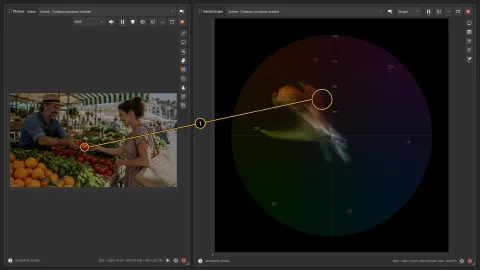
The produce market has skin, fabric and colorful fruit in one picture. Connect a selected area with its Vectorscope contribution.
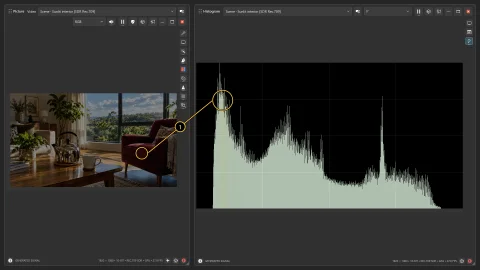
A sunlit interior combines a bright window with shaded furniture. Histogram helps explain how much of the picture occupies each brightness range.
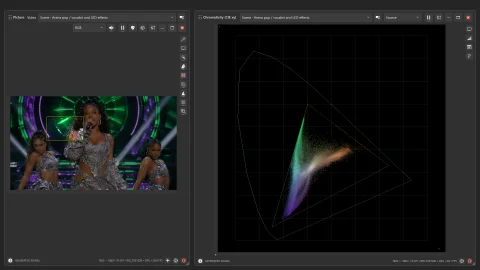
Concert lighting makes a useful contrast with neutral studio scenes. Keep its creative purpose in mind while checking color and exposure.
In Professional, start with Shot Evaluator for a quick summary of framing, lighting, focus, motion and audio. Use face highlights to find the people in the picture, or ask AI for a technical or creative second opinion. Camera controls and the LUT Builder help turn what you learn into an adjustment.
Screenshots show the application using bundled practice scenes, generated signals, recorded footage or the input named in the caption. A sequence keeps the same source when it is teaching an adjustment. Open a full-size image for labels and controls; annotated examples also link to the clean original.
Find the generated-input and practice reference · Browse all guided examples