
Scope guide · History & 3D
3D Picture
Keep the current picture and a rolling stack of sampled images in a rotatable 15-second history.
ProfessionalLearn & Reference / Scope library / 3D Picture
What did the picture look like a few seconds ago?
Add this view from Add scope > 3D Picture, then choose the input you want to inspect. Use the pane's i button for its in-app reading guide.
Read this example.
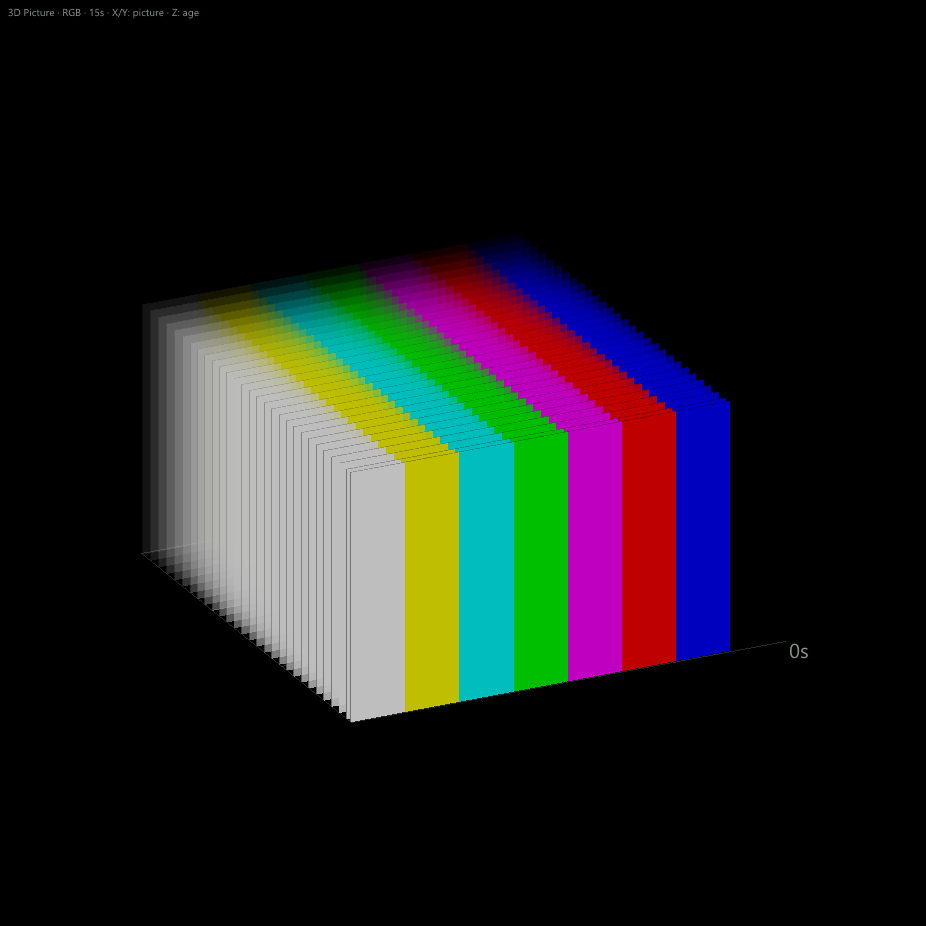
- The newest, opaque image is at the edge labeled 0s.
- Older sampled images recede and fade. Repeated bars show the same picture at successive ages.
- Depth is elapsed time; horizontal and vertical coordinates retain picture geometry.
Try it yourself.
- Open 3D Picture from Add scope or the Picture cube icon.
- Choose a moving source for changes or a still to learn the geometry.
- Drag to rotate, wheel to zoom, double-click to reset, and Freeze to inspect.
Useful controls.
- RGB, Y′ and linear luminance select representation.
- The live plane updates with rendering; two 192×128 snapshots per second build history.
- Clear history starts fresh; workspaces retain display settings.
History supplies sampled visual context. Use media playback or Recorder when retaining media for later review.